
Make the NerdyTags Business portal feel like your own. Branding changes how the portal and your sign-in page look to your team, and a portal domain lets your team use the portal at an address you own.
Branding
In NerdyTags Business, go to Settings > Branding.
Change any of the settings below.
Click Save branding.
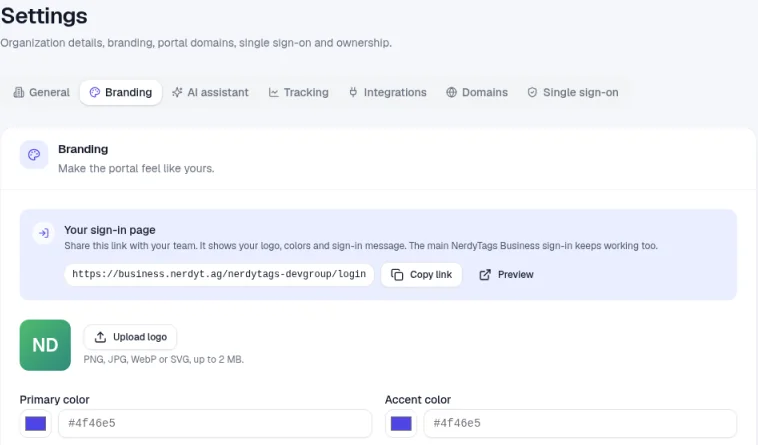
Setting | What it does |
|---|---|
Upload logo | Your logo for the portal. Use a PNG, JPG, WebP or SVG file up to 2 MB. |
Primary color and Accent color | Your brand colors, as hex codes like #4f46e5. |
Portal name | Shown in the browser tab and in emails. |
Favicon URL | The small icon in the browser tab. Use a square PNG or ICO file and an https:// address. |
Sign-in heading and Sign-in message | Shown on your company sign-in page. |
Hide "Powered by NerdyTags" | Removes the badge from the portal sidebar. |
Your sign-in page
Your organization has its own sign-in page at business.nerdyt.ag/ followed by your portal URL and /login. It shows your logo, colors and sign-in message. Click Copy link to share it with your team, or Preview to see it. The main NerdyTags Business sign-in keeps working too.
Portal domains
A portal domain lets your team use the portal at an address you own, like portal.yourcompany.com. On your own domain, the portal shows only your organization, with your branding. Members can always sign in on NerdyTags Business as well.
Each organization can add up to 3 portal domains. Portal domains must be subdomains, like portal.yourcompany.com. Root domains, like yourcompany.com, aren't supported.
This is different from a custom domain for a single profile. For that, see How to add a custom domain to your profile.
Step 1: Add the domain
Go to Settings > Domains.
Enter your subdomain, for example portal.yourcompany.com. The page reminds you: "Use a subdomain you control. You will point it to portals.nerdyt.ag."
Click Add domain. The button stays greyed out until you enter a domain.
The Domains tab shows how many portal domains you've added, for example 1 of 3.
Step 2: Add the DNS records
The page lists the DNS records to add: a CNAME record that points your subdomain to portals.nerdyt.ag, plus any verification records shown. Use the exact values shown for your domain, and click the copy button next to each value to avoid typos.
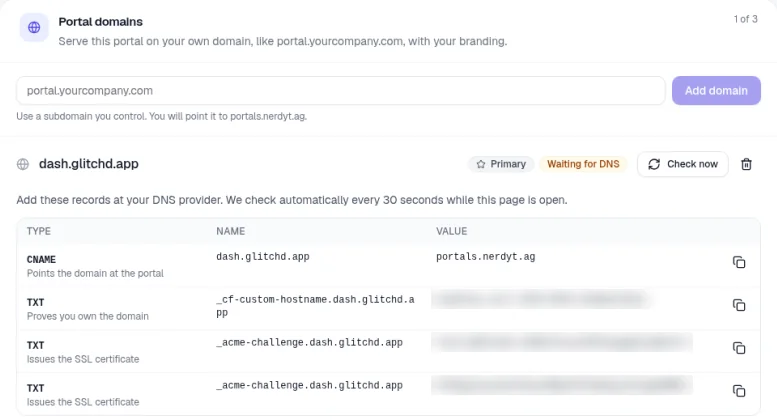
Type | What it's for |
|---|---|
CNAME | Points the domain at the portal. Its value is portals.nerdyt.ag. |
TXT (name starts with _cf-custom-hostname) | Proves you own the domain. |
TXT (name starts with _acme-challenge) | Issues the SSL certificate, so the portal works over https. There may be more than one. |
In a new tab, sign in to your domain provider and open the DNS settings for your domain.
Add each record, copying the type, name and value exactly.
Save the records at your provider.
Some providers add your domain to the end of the name for you. If yours does, enter only the first part of the name, for example portal or _acme-challenge.portal.
Step 3: Wait for it to go live
While the page is open, we check your records automatically every 30 seconds. Click Check now to check straight away. As each record is found, it disappears from the list.
The domain shows Waiting for DNS until both your domain and its SSL certificate are verified, then changes to Active. This often takes just a few minutes, but DNS changes can sometimes take longer to spread.
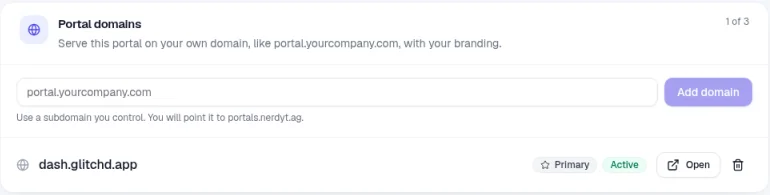
Once it's Active, click Open to visit the portal on your domain. You can also click View portal at the top of the page.
Primary domain and removing a domain
The first domain you add becomes your primary domain automatically and is marked Primary. To make a different domain primary:
Go to Settings > Domains.
Find a domain that's Active and isn't already primary.
Click Make primary.
To do this, you need the Manage custom portal domains permission, which Owners and Admins have. See Roles and permissions in NerdyTags Business. Your organization also needs to be active, not read-only.
To remove a domain, click the trash icon next to it (Remove domain). If you remove your primary domain, the oldest remaining domain becomes primary. Members can always sign in to NerdyTags Business at business.nerdyt.ag, with or without a portal domain.
Troubleshooting
Still Waiting for DNS after a few hours? Check that each record's type, name and value match the page exactly, and that there isn't an older record with the same name.
Can I use my main domain, like yourcompany.com? No, portal domains need to be a subdomain. Use something like portal.yourcompany.com instead.
My provider won't let me add the CNAME. Look for an existing A or CNAME record with the same name, and remove or edit it.
Still stuck? Email [email protected] with your domain and a screenshot of your DNS records.