
The signup widget shows an email signup form on your profile, so fans can join your mailing list without leaving the page. Every plan can collect subscribers.
Turn on the signup widget
In your dashboard, click Subscribers in the sidebar.
Click the Signup widget tab.
Turn on Widget Active.
Fill in the text and choose the fields (see below), then save your changes.

What visitors see
When someone opens your profile, the signup form pops up in the middle of the screen. It shows your Title and Subtitle, the fields you've turned on and your signup button. Visitors can close it with the x if they'd rather not sign up.
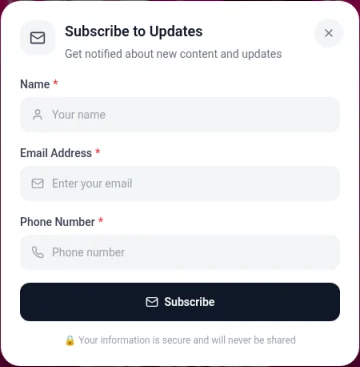
To check it, open your profile with View on your dashboard.
Customize the form
Setting | What it does |
|---|---|
Title | The heading above the form, for example "Join my newsletter" |
Subtitle | A short line under the title, like what people get by signing up |
Button Text | The label on the signup button |
Success Message | What people see after they sign up |
Email Placeholder | The hint text inside the email box |
Show Name Field | Also asks for the subscriber's name |
Name Placeholder | The hint text inside the name box |
Show Phone Field | Also asks for a phone number |
Phone Placeholder | The hint text inside the phone box |
Asking for less usually gets more signups. Turn on the name and phone fields only if you'll use them.
Subscriber limits
Plan | Email subscribers |
|---|---|
Free | 500 |
Pro | 1,000 |
Business | Unlimited |
If you downgrade or cancel, your current limit stays until the end of your billing period. After that, your account moves to Free and the Free limit of 500 applies. If your list is getting close to your limit, export a copy from the Subscribers tab or connect an email tool on Pro or Business.
Other ways to collect emails
Subscription Protection on a link asks visitors to subscribe before the link opens. It's available on all plans. See Link options: styles, galleries, scheduling, passcodes and contact forms.
To get notified about each new subscriber, turn on New subscribers in your notification settings. See Managing your notifications.