
Integrations connect NerdyTags to the tools you already use. Send new subscribers to Mailchimp or a Google Sheet, or connect your Shopify store to your links.
Plan limits
Integrations are free to connect, but your plan sets how many email integrations you can use:
Plan | Email integrations | Shopify |
|---|---|---|
Free | None | No |
Pro | 1 | No |
Business | 5 | Yes |
The Integrations tab on the Subscribers page shows how many you've used, for example "1 / 5 integrations used".
Connect an integration
In your dashboard, go to Settings > Integrations.
Filter by All, Email Marketing or E-commerce to find the app.
Click Connect Now and follow the steps to sign in to the other service and give NerdyTags access.
You can also start from Subscribers > Integrations and click Use Integration.
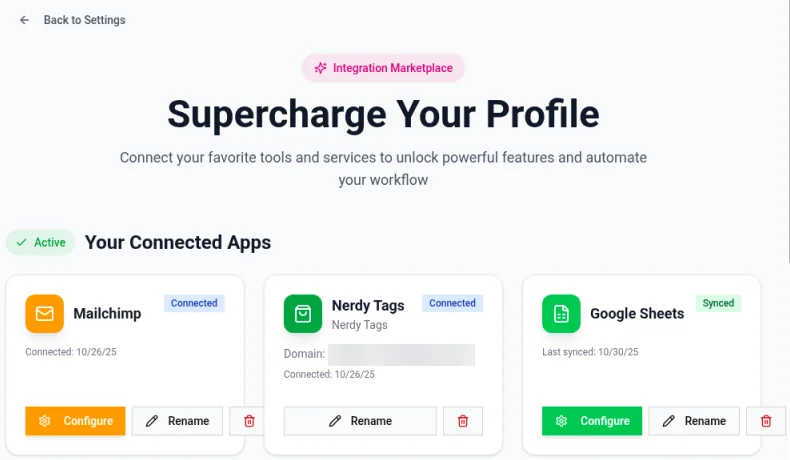
Manage connected apps
Your connected apps are listed under Your Connected Apps. For each one you can:
Click Configure to change its settings.
Click Rename to give it a name you'll recognize.
Click Sync to send the latest subscribers now.
Click the trash icon to disconnect it.
After you connect an app, click Sync and check the other tool to make sure your subscribers came through.
Mailchimp
Connect Mailchimp to add new subscribers to a Mailchimp audience automatically. Available on Pro and Business.
Google Sheets
Connect Google Sheets to add each new subscriber as a row in a spreadsheet. It's an easy way to share your list with a team. Available on Pro and Business.
Shopify (Business)
Connect your Shopify store to use it with your links. Once connected, open the Shopify option on any link card. See Link options: styles, galleries, scheduling, passcodes and contact forms.
Troubleshooting
Subscribers aren't showing up in the other tool. Open the integration, click Sync, and check its settings with Configure.
I can't add another integration. You may have reached your plan's limit. Disconnect one you don't use, or upgrade.
A connection stopped working. Disconnect it and connect it again. This refreshes its access.