
Put a button for your NerdyTags profile on your website or Twitch panel. Visitors click it to open your public profile, and those visits show up in Analytics with their own source labels.
Open the Embed tab
In your dashboard, open Share in the sidebar.
Click the Embed tab.
Choose a style, theme and accent color (see below).
Click Copy HTML to paste the snippet into your site, or Download PNG for an image you can upload elsewhere.
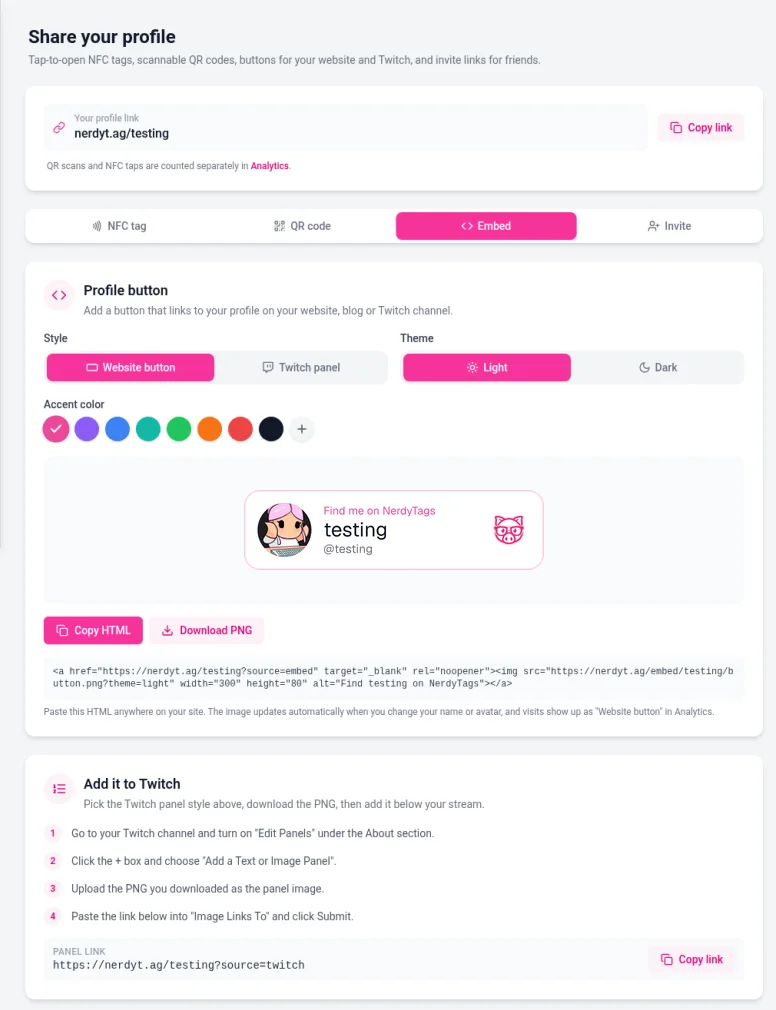
Share also has NFC tag, QR code and Invite tabs. See Sharing your profile with a QR code, Using NFC tags with NerdyTags and Inviting friends to NerdyTags.
Style, theme and accent
Control | Options |
|---|---|
Style | Website button for most sites, or Twitch panel for a Twitch about panel. |
Theme | Light or Dark, so the button fits light or dark backgrounds. |
Accent | Preset colors, or pick your own. |
The preview updates as you change these. The HTML snippet and PNG match what you selected.
Add it to a website
Click Copy HTML.
Paste the snippet into your page where you want the button.
Publish or refresh the page and click the button to confirm it opens your profile.
The embed link includes ?source=embed on your profile URL. In Analytics, those visits are tracked as a website button source. The button image can update when your profile changes, so you usually don't need to re-download the PNG after small profile edits.
Add it to Twitch
On the Embed tab, choose Twitch panel if you want the panel-sized look, then Download PNG.
On Twitch, enable edit panels on your channel, add a new panel and upload the PNG.
Set the panel link to your profile with
?source=twitchon the end. Use Copy link next to the Twitch panel link on the Embed tab when it's shown, so tracking stays correct.
Visits from that link are tracked with a Twitch source label in Analytics.
Good to know
Your profile needs to be publicly reachable for the button to work for visitors.
If you manage more than one profile, switch to the right profile before you copy the embed.
QR scans and NFC taps are counted separately from embed and Twitch traffic. See Understanding your analytics.