
Invite friends to NerdyTags with your personal invite link. When they sign up and finish setting up a profile, they count toward your invite badges and Free Pro rewards.
Get your invite link
In your dashboard, open Share in the sidebar.
Click the Invite tab.
Under Invite a friend, copy Your invite link. It looks like
nerdyt.ag/invite/followed by your code.Share the link in a message, bio or post.
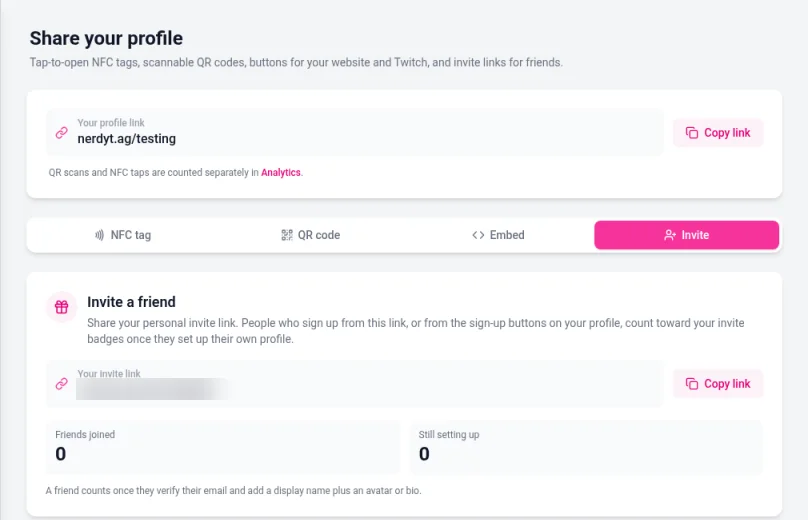
People who sign up from this link, or from the sign-up buttons on your profile, can count toward your invites once they set up their own profile.
Share also has NFC tag, QR code and Embed tabs for other ways to share. See Sharing your profile with a QR code and Embedding your profile button.
Friends joined and Still setting up
The Invite tab shows two counts:
Card | Meaning |
|---|---|
Friends joined | Friends who finished the steps that qualify. |
Still setting up | Friends who started from your invite but have not finished yet. |
A friend counts once they verify their email and add a display name plus an avatar or bio. Until then, they stay under Still setting up.
Invite badges
Badges appear as you reach invite milestones:
Badge | Qualifying friends |
|---|---|
Recruiter | 1 |
Connector | 5 |
Ambassador | 25 |
Check your Achievements or profile badge area to see which ones you've earned.
Free Pro from invites
Under Free Pro on the Invite tab, you can earn free Pro time when enough friends qualify:
1 free month of Pro for every 10 qualifying friends.
Up to 12 free months per year from invites.
Qualifying friends are the same ones that move into Friends joined. Free Pro from invites follows the same Pro features as a paid Pro month while it is active. See Free, Pro and Advanced plans compared and Billing and subscription management.
Good to know
Your invite link is personal to you. Don't post someone else's invite code as your own.
Self-invites and duplicate accounts should not count. If something looks wrong, email [email protected].
Changing your username does not change your invite link format (
nerdyt.ag/invite/...), but it does change your public profile address.