
Deleting your account is immediate and permanent. Your account and its data are removed right away and can't be recovered, so please read the steps below before you start. If you only want a break, you can turn off individual links with their Active switch instead.
Before you delete
Export your subscribers. Once your account is deleted, your subscriber lists are gone for good. Go to Subscribers and click Export CSV for each profile whose list you want to keep. See Viewing and exporting your subscribers.
Cancel any app store subscription. If you upgraded in the iOS or Android app, Apple or Google bills you, and deleting your account doesn't cancel that subscription. Cancel it in your phone's subscription settings first. See Billing and subscription management.
Cancel a web subscription. If you pay on the web, use the cancel option on the Billing page first, so you're sure your subscription has ended.
Tell your admins. Every profile you created is deleted along with your account, including profiles other people help you manage. Let them know before you go.
Update printed codes and links. Your profile addresses stop working, so QR codes, NFC tags and links in your bios will no longer open your profiles.
Delete your account
In your dashboard, go to Settings > Account.
Scroll to Delete account.
Click Delete account.
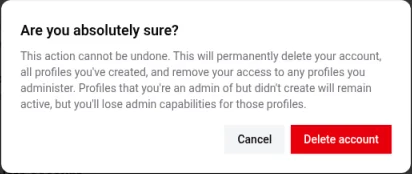
A window asks Are you absolutely sure? Read the warning, then click Delete account to confirm, or Cancel to keep your account.
What happens when you delete
Your account is deleted as soon as you confirm. This can't be undone, and we can't recover your data afterward.
Your login information is permanently removed.
All profiles you created with this account are deleted, along with their links, subscribers and stats.
You lose admin access to profiles you help manage. Those profiles stay active for their owners.
Your usernames become available right away, so someone else could claim them. If you think you might want a username again, don't delete your account.
Need help instead?
If something isn't working the way you'd like, email [email protected] before you delete. We may be able to fix it.