
Updated October 26, 2026
Here's a roundup of features we've added to NerdyTags recently, with links to the full guides.
October 26, 2026
Short links for single links. Every link card now has a Share short link icon. Copy a short ndy.bio link that opens just that link's preview on your profile, or make a QR code or NFC tag for it. On every plan. See Link options: styles, galleries, scheduling, passcodes and contact forms.
October 19, 2026
Following tab. Show visitors the profiles you follow with the new Following tab, and feature up to 6 of them at the top. On every plan. See Adding tabs to your profile.
Banner size guide and focus point. The Banner tab on Customize now previews your banner on desktop, tablet and phone screens. Click Size guide to see the recommended size (1920 x 720 pixels) and the phone-safe zone, and use Adjust to set a focus point that stays in view on every screen. See How to customize your profile theme.
Short link on Share. Switch to Short link at the top of the Share page to copy a shorter ndy.bio address for your bios. Your QR code and NFC tags keep using your full nerdyt.ag link. See Sharing your profile with a QR code.
Discover Boost on Pro and Advanced. Pro and Advanced profiles now rank higher in Trending on Discover and get a PRO badge on their Discover card. See Free, Pro and Advanced plans compared and Discover, followers and messages.
October 12, 2026
Shopify connect redesign. Connecting Shopify now uses a Dev Dashboard app: paste the app's Client ID and Client secret into NerdyTags (recommended for new apps). Stores that already have a custom app created in Shopify admin before January 1, 2026 can still use an Existing token (Storefront API access token). See Connecting your Shopify store and Connecting Mailchimp, Google Sheets, Shopify and other integrations.
October 9, 2026
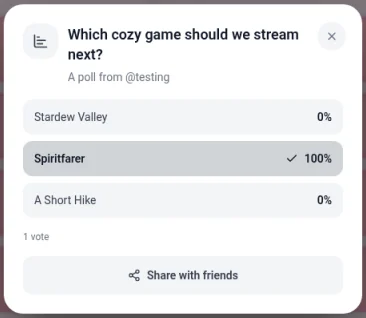
Polls and giveaways. Turn any link into a poll or a giveaway with the new Poll or giveaway icon on the link card. Visitors vote or enter in a pop-up right on your profile, and you can limit it to followers or set an end time. Export results and entries as a CSV, and draw giveaway winners at random when you're ready. On every plan. See Polls and giveaways.
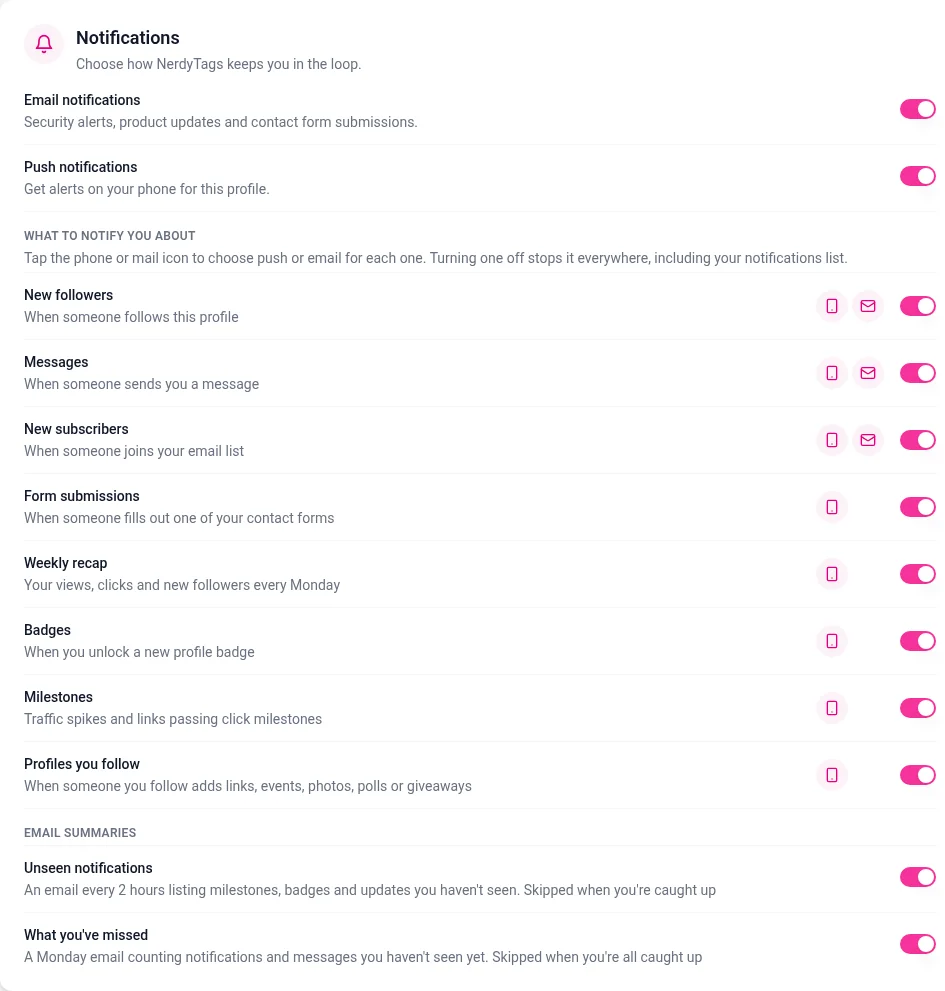
Notifications from profiles you follow. Get notified when someone you follow adds links, events, photos, polls or giveaways, on your Notifications page, by push and by email. Turn it off for any profile from the Following button on their profile, or with the bell on Connections. See Discover, followers and messages.
Simpler notification settings. Each notification now has one row in Settings > Account under Notifications, with a switch to turn it off everywhere and phone and mail icons to choose push or email. New rows for the achievement notifications Badges and Milestones, and for Profiles you follow, sit alongside New followers, Messages, New subscribers, Form submissions and Weekly recap. The unread message email is now the mail icon on Messages, and the new EMAIL SUMMARIES group has Unseen notifications (every 2 hours) and What you've missed (Mondays). These settings apply to every profile you manage. On the Notifications page, each notification's menu now has Why am I seeing this?. See Managing your notifications.
October 7, 2026
Age lock for Gallery photos. Turn on Age lock for any photo in your Gallery tab, and visitors enter their date of birth to confirm they're 18 or older before it opens. Handy for cosplay, horror game art and spoilers. On Pro, Advanced and premium pages. See Adding tabs to your profile.
October 6, 2026
Share embed and invite. Share in the sidebar now has NFC, QR, Embed and Invite tabs. Add a website or Twitch button, or invite friends for badges and Free Pro months. See Embedding your profile button and Inviting friends to NerdyTags.
What you've missed. A Monday email for notifications and messages you haven't seen yet, plus the push Weekly recap every Monday. See Managing your notifications.
Business Analytics. Filter by profile and 7D / 30D / 90D, compare KPIs to the previous period, and switch Daily, By hour and By location charts. Export stays on Leads. See Analytics, leads and inbox in NerdyTags Business.
Duplicate automations. Copy an automation from the list, start the copy Off, and reconnect apps if needed. Turn automations on or off from the list. See Automations in NerdyTags Business.
Portal email branding. Sender name, reply-to, colors, logo and footer on Settings > Branding, with a team invitation preview and test email. See Branding your portal and adding a portal domain.
Lower prices, and Business is now Advanced
Added October 5, 2026. NerdyTags plans now cost less, and the Business plan for personal accounts has a new name: Advanced. Apart from the new profile admin limits below, its features are the same as before.
Plan | Monthly | Yearly |
|---|---|---|
Pro | $2.99/month | $29.99/year ($2.50 a month) |
Advanced | $8.99/month | $89.99/year ($7.50 a month) |
If you already subscribe, you keep your current price.
Profile admin limits have changed too: 2 on Free, 4 on Pro and 8 on Advanced. See Free, Pro and Advanced plans compared.
NerdyTags Business, the team workspace, keeps its name and now starts at $14.99 per seat per month, or $11.99 per seat per month billed yearly. Volume pricing brings the price down as your team grows, to as little as $7.19 per seat per month with 200 or more seats. Existing subscriptions keep their current price. Every profile your team manages gets NerdyTags Advanced features, and new organizations can try it free for 14 days with 4 seats and no credit card. See Business billing and seats.
A redesigned link manager
Added October 4, 2026. The Links page in your dashboard has a fresh new look, with a live phone preview of your profile beside it on a computer.
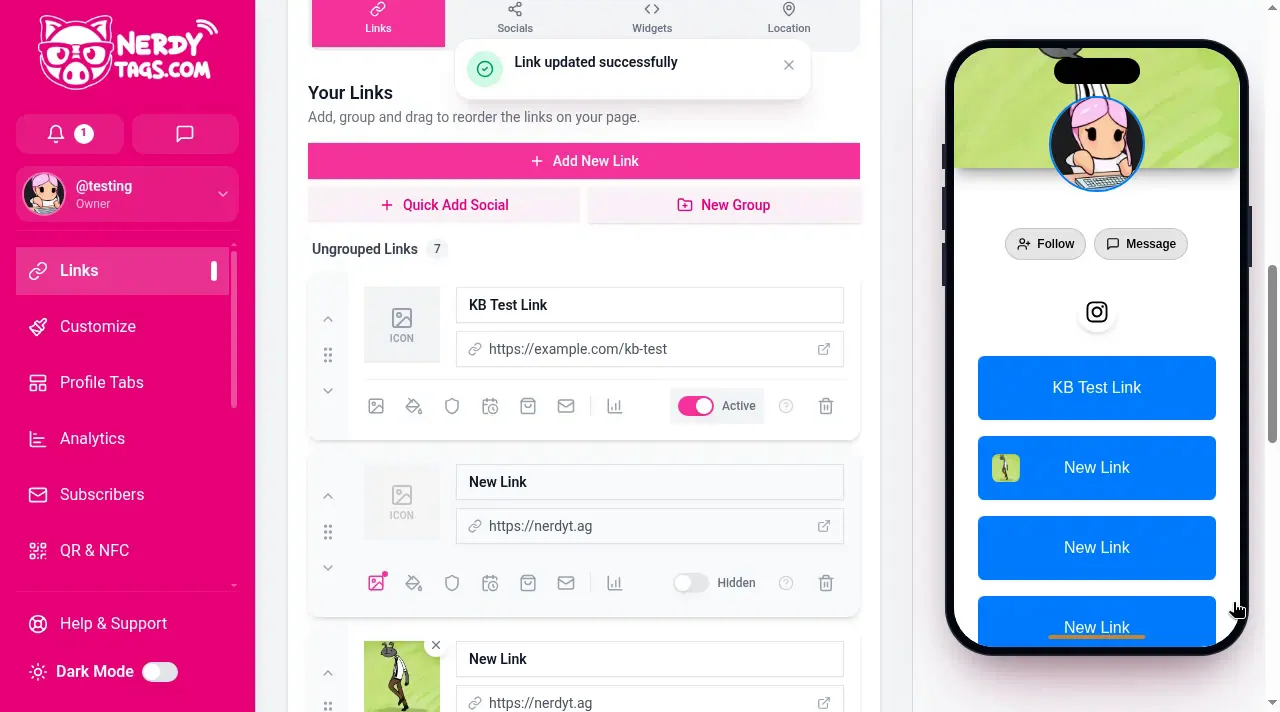
Edit right in the list. Add New Link adds a new card at the top of your list, and you type the name and web address straight into the card. Changes save automatically.
Show or hide in one click. Each card has a Hidden/Active switch. New links start out Hidden until you switch them to Active.
Reorder your way. Drag a link by its handle to move it. You can also use the Move link up and Move link down buttons.
Groups. New Group adds a section to your list. Rename it, drag links into it and move it with Move group up and Move group down.
Every option on the card. The icons along the bottom of each card open Gallery, Button Layout, Restriction settings, Schedule link visibility, Shopify, Contact Form, Poll or giveaway and View Link Analytics.
A guided tour. Click the question mark on any link for a 12-step tour of the link card.
Easier on a phone. The cards stack to fit your screen, and the pink Preview button opens your profile in a Preview sheet.
See How to create and manage links and Link options: styles, galleries, scheduling, passcodes and contact forms.
More control over your notifications
Added October 4, 2026. You can now choose more of the emails NerdyTags sends you, in Settings on the Account tab under Notifications:
New followers and New email subscribers are included in your daily activity email, only on days someone follows this profile or joins your email list.
Unread messages sends an email when a message has been waiting for an hour, at most once per chat until you read it.
The Notifications page has new tools too: Mark all as read, an unread count on the Unread filter, and a menu on each notification with Mark as read and Delete. See Managing your notifications.
These settings have a new layout since October 9, 2026. See the October 9 entry above.
NerdyTags Business for teams
NerdyTags Business is a new shared workspace for agencies, teams and growing brands. Create on-brand profiles for your whole team, manage clients' profiles with their permission, answer messages together in a shared inbox, and see leads and analytics from every profile in one place. You can also add your own branding and portal domain, single sign-on and a full audit log. Every profile in the workspace gets NerdyTags Advanced features. Pricing is per seat, and each seat adds a team member and up to 10 profiles. See Getting started with NerdyTags Business.
Groups, custom roles and the AI assistant
NerdyTags Business now has a few more ways to organize a growing team:
Groups sort your team into regions, offices or departments, each with its own profiles. Everyone gets a role just for that group, and group managers can run their group without being admins. See Organizing your team with groups.
Roles now include a Member role for group-only access, and you can make custom roles with exactly the permissions you need. See Roles and permissions in NerdyTags Business.
The AI assistant suggests profile text and message replies in your team's voice. Your team reviews every suggestion before saving or sending. It's available on organizations with 4 or more seats. See Using the AI assistant in NerdyTags Business.
Webhooks, Zapier, HighLevel and Asana
Added October 3, 2026, and updated October 5, 2026. Webhooks, HighLevel, Asana, Mailchimp and Google Sheets now connect on an automation, not under Settings. Create an automation first, then add apps or a webhook to it. See Automations in NerdyTags Business and Sending leads to Zapier, Make and other apps with webhooks.
Company Google Analytics and Meta Pixel IDs stay under Settings > Tracking. See Company tracking and integrations.
Signup forms on company profiles
Added October 3, 2026. Company profiles now have their own signup form in the Subscribers section of the profile editor. Set the heading, subtitle, button text and success message, and choose whether to ask for a name or phone number. New subscribers also appear in your company Leads. See Creating and managing company profiles.
Duplicate profiles and company profiles in the NerdyTags app
Added October 3, 2026. In NerdyTags Business, click Duplicate on a profile to make a company-owned copy with the same design, links, social icons, widgets and tabs. Followers, messages, subscribers, analytics and the custom domain stay with the original. See Creating and managing company profiles.
You can also give team members company profiles to use in the regular NerdyTags app and mobile app, alongside their own profiles. Choose them under NerdyTags app access on Members. Your organization's access rules still apply in the app, and changes are logged for your company. See Giving team members a company profile in the NerdyTags app.
Organizations in Settings
If an agency or company helps run your profile, you can now give their team access with a join code. Go to Settings > Account and click Organizations under Security. You choose exactly what they can change, you stay the owner, and you can remove their access at any time. See Letting an agency or company manage your profile.
Link options on every link
Each link card now has a row of icons for extra options. Button Layout, Gallery, Contact Form, age restriction and subscription protection are on every plan. Passcode protection and scheduling are on Pro and Advanced, and Shopify is on Advanced. See Link options: styles, galleries, scheduling, passcodes and contact forms.
Link background images
Give a link its own background image from Button Layout on the link card. Images are cropped to a wide 5:1 shape.

Animated images
Upload GIFs and animated WebP images for your profile photo, banner and link images.

More customization options
Banner masks
Give your banner a shaped edge with banner masking, on the Banner tab of Customize (Pro and Advanced).

Social button styles
New colors and shapes for social buttons, in Customize > Buttons and Customize > Colors.

Advanced and animated button styles (Pro and Advanced)
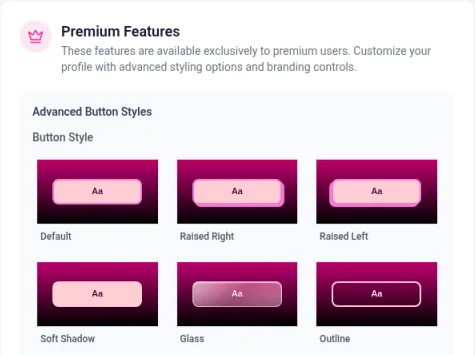
Find them on the Premium tab of Customize, with styles such as Raised Right, Soft Shadow, Glass and Outline.
See How to customize your profile theme.
Custom CSS and white label (Advanced)
Write your own CSS and remove NerdyTags branding. See Custom CSS and removing NerdyTags branding.

Profile tabs
Add About, Events, Gallery, Games and Achievements tabs to your profile. Events and Gallery are on Pro and Advanced. You can rename and reorder tabs, choose whether the tab bar shows names, icons or both, and tabs stay hidden until you add something to them. See Adding tabs to your profile.
Embedded content
On every plan, links from Instagram, TikTok, YouTube, X, Spotify, Vimeo, Apple Music, SoundCloud, Mixcloud, Twitch and Google Maps can show as playable content right on your profile. On Pro and Advanced, you can also add custom HTML widgets and choose exactly where they appear. See Adding widgets and embeds to your profile.
Grow your audience
Email signups: collect subscribers with the signup widget, and send them to Mailchimp or Google Sheets on Pro and Advanced. See Collecting email subscribers with the signup widget.
Discover, followers and messages: find other creators and chat with the people you follow. See Discover, followers and messages.
QR codes and NFC: share your profile in person, and track scans and taps separately in Analytics. See Using NFC tags with NerdyTags.
Teams and multiple profiles
Run several profiles from one account and invite admins: 2 on Free, 4 on Pro and 8 on Advanced. Choose which profiles get your paid features with premium pages. See Managing multiple profiles and profile admins.
Custom domains
On the Advanced plan, use your own domain, like links.yourbrand.com, for your profile. See How to add a custom domain to your profile.
Media pack
Need our logo for a video or a partner page? Download the NerdyTags media pack, with SVG and PNG logos in color and white versions.
Getting help
Browse this help center at support.nerdyt.ag, or open Help & Support from the bottom of the dashboard sidebar.
Email [email protected].
Join the NerdyTags Discord community.
Ready to try them? Open your dashboard, or compare plans on the plans page.